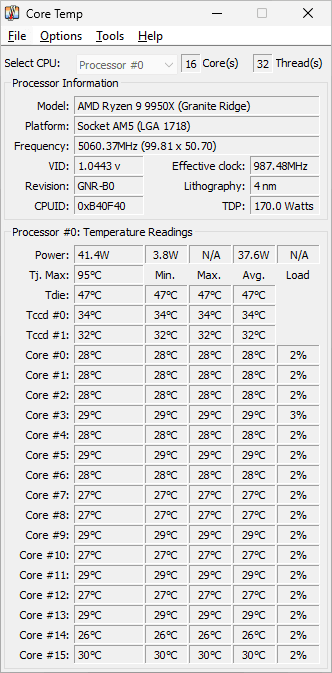
Core Temp is a small Windows program that shows the temperature of every core of your processor in real time. For CPU miners it answers one practical question: how hot does each core run when a miner such as XMRig keeps the whole chip under full load for hours? The Core Temp download is a 1.8 MB installer, and the developer also offers standalone ZIP builds that run without installing.
Core Temp is a processor tool, not a rig dashboard. It reads the digital thermal sensors built into Intel, AMD and VIA x86 CPUs, so it is useful on a CPU-mining PC or on the host machine of a GPU rig, but it does not replace the GPU monitoring in your mining OS or GPU tools. We have not tested it on our own rigs yet; the facts below come from the developer’s website, checked on 13 November 2026.
Core Temp at a glance
| Item | Details |
| Latest version | 1.21 (installer build 1.21.0.207), released 3 October 2026 |
| Licence / fees | Shareware (conditionally free): free for personal use; businesses need a commercial licence per physical machine |
| Platforms | Windows 11, 10, 8/8.1, 7 and XP; Windows Server 2003 to 2025 |
| Supported hardware | Intel, AMD and VIA x86 processors with a digital thermal sensor (the developer publishes a supported CPU list) |
| Developer | ALCPU |
| Official website | alcpu.com |
| Best for | Watching per-core CPU temperatures on a CPU-mining PC |
What it does
- Shows the temperature of each core of every processor in the system, updated in real time as the load changes.
- Reads the CPU’s own digital thermal sensor (DTS), which the developer describes as more accurate than the motherboard’s sensors, so it does not depend on the motherboard model.
- Puts readings into notification-area (tray) icons; version 1.21 redesigned the dialog where you choose which icons appear.
- Writes readings to a log file; 1.21 fixed the custom log path not being applied at start-up.
- Has an overheat protection feature with an on-screen warning, which 1.21 made a top-most window so it is not hidden behind other programs.
- Supports plug-ins and add-ons, including a monitoring app for Android and Windows Phone devices listed on the official site.
- Comes in more than 30 interface languages through separate language packs.
How miners use it
Check core temperatures under a CPU miner
- Start Core Temp before the miner and note the idle temperature of each core.
- Start your CPU miner, for example XMRig, and let it run for at least 15 to 20 minutes so the cooler and case reach a steady state.
- Compare the cores. One core much hotter than the rest can point to poor cooler contact or old thermal paste rather than to the miner.
- If temperatures keep rising, reduce the miner’s thread count or improve cooling before you leave the PC unattended.
Keep a temperature log overnight
- Turn on logging in Core Temp’s settings and choose a folder for the log file.
- Leave the miner running overnight.
- Open the log in the morning and look for spikes at the times when the room was warmest or the PC was busy with other work.
Watch the PC from a phone
The developer lists a Core Temp monitoring app for Android and Windows Phone on the official website. Follow the setup instructions there; we have not tried it yet.
Install and first run
- Requirements: Windows 11, 10, 8/8.1, 7 or XP, or Windows Server 2003 to 2025, on an Intel, AMD or VIA x86 processor. Version 1.21 uses a newer compiler and no longer supports Windows 2000.
- Installer or ZIP: the installer is about 1.8 MB. If you prefer not to install anything, the official site also offers standalone 32-bit and 64-bit ZIP builds.
- Verify the file: the official download page publishes SHA-256 and MD5 checksums for the installer, the ZIP builds and the language packs. Compare them before you run the file.
- Update older copies: 1.21 mitigates vulnerabilities in the legacy 64-bit driver (reference JVN#23328936) and fixes a crash on Intel systems with more than one Intel GPU, including the integrated one.
- Uninstall: the developer says the program can be removed at any time from Windows’ Programs and Features.
Limitations
- CPU only. Core Temp is built around processor sensors. For GPU temperatures, fan speeds and memory junction readings on a GPU rig, use your mining OS dashboard or the GPU vendor’s tools.
- Windows only. There is no Linux build, so it does not run inside Linux-based mining operating systems.
- Not free for business use. Personal use is free, but a business needs a commercial licence for each physical machine. If you run mining as a business, read the licence terms on the official site first.
- No mining features. It does not control the miner, change clocks or limit power. It only shows and logs readings.
- Not tested yet on our own hardware.
Core Temp vs alternatives
Core Temp does one job: per-core CPU temperature with very little overhead. Broader hardware monitors such as HWiNFO or HWMonitor also read GPU, motherboard and drive sensors, which is handy on a mixed rig but means more to set up and watch. On a GPU rig running a Linux mining OS, the OS dashboard already shows GPU temperatures, and Core Temp cannot run there at all. For a Windows PC mining with XMRig, Core Temp is a simple way to watch the CPU.
FAQ
Is Core Temp free?
It is free for personal use. Businesses need a commercial licence for each physical machine, so the licence is shareware (conditionally free) rather than fully free.
Is Core Temp safe?
Download it from the official website and check the SHA-256 checksum published there. Version 1.21 also fixed known vulnerabilities in the old 64-bit driver, so update older copies. We have not tested it ourselves yet.
Does Core Temp show GPU temperature?
It is designed to read processor sensors. Use your mining OS or GPU tools for graphics-card temperatures.
Does Core Temp work on Windows 11?
Yes. The developer lists Windows 11, 10, 8/8.1, 7 and XP, plus Windows Server 2003 to 2025.
Is there a portable Core Temp?
Yes. Besides the installer, the official site offers standalone 32-bit and 64-bit ZIP builds.
Does Core Temp support AMD Ryzen processors?
Core Temp supports Intel, AMD and VIA x86 processors. Check the developer’s supported CPU list for your exact model.
What is new in Core Temp 1.21?
A redesigned tray-icon settings dialog, fixes for tray icons and the custom log path, a crash fix for systems with several Intel GPUs, mitigation of legacy 64-bit driver vulnerabilities, better recognition of some older AMD processors, and a top-most overheat warning.
Last verified on 13 November 2026 against the official Core Temp website (download page, change log, commercial licence page). Not tested yet.
Last checked against official sources: 13 November 2026 (developer website: alcpu.com). Versions and licence terms change — confirm on the developer's site before deploying in production.