
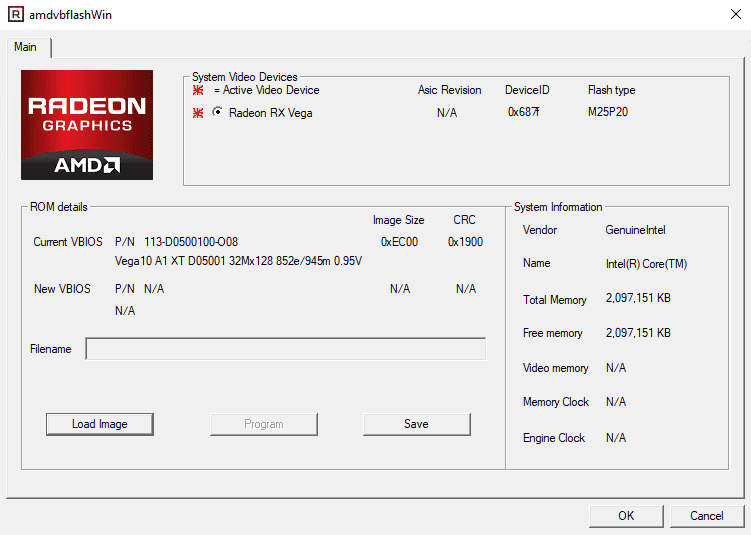
What is AMDVBFlash / ATIFlash?
AMDVBFlash / ATIFlash is a utility software designed for flashing and modifying the BIOS (Basic Input/Output System) of AMD graphics cards. The tool allows users to update, backup, and restore their graphics card’s BIOS, which can be useful for troubleshooting, upgrading, or downgrading the card’s firmware.
AMDVBFlash / ATIFlash is commonly used by gamers, overclockers, and IT professionals who need to modify their graphics card’s settings to achieve optimal performance or fix compatibility issues. The software supports a wide range of AMD graphics cards, including Radeon and FirePro models.
Main Features
AMDVBFlash / ATIFlash offers several key features that make it a popular choice among users:
- BIOS flashing and updating: The software allows users to update their graphics card’s BIOS to the latest version, which can improve performance, fix bugs, and add new features.
- BIOS backup and restore: AMDVBFlash / ATIFlash enables users to backup their graphics card’s BIOS before making any changes, which can be useful in case something goes wrong during the flashing process.
- BIOS modification: The software allows users to modify their graphics card’s BIOS settings, such as the GPU clock speed, memory clock speed, and voltage.
Installation Guide
System Requirements
Before installing AMDVBFlash / ATIFlash, make sure your system meets the following requirements:
- Operating System: Windows 7, 8, 8.1, 10 (32-bit or 64-bit)
- Graphics Card: AMD Radeon or FirePro graphics card
- Processor: Intel or AMD processor
- RAM: 2 GB or more
Download and Installation
To download and install AMDVBFlash / ATIFlash, follow these steps:
- Download the latest version of AMDVBFlash / ATIFlash from the official website or a trusted source.
- Extract the downloaded zip file to a folder on your computer.
- Run the installation executable file (usually named