
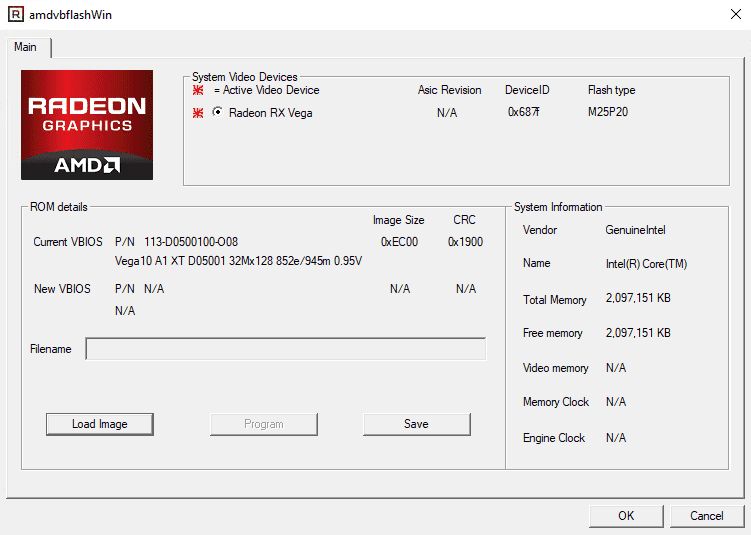
What is AMDVBFlash / ATIFlash?
AMDVBFlash / ATIFlash is a popular software tool used for updating and modifying the BIOS (Basic Input/Output System) of AMD graphics cards. It allows users to flash their graphics card’s BIOS to the latest version, which can improve performance, fix bugs, and add new features. In this article, we will delve into the world of AMDVBFlash / ATIFlash, exploring its features, benefits, and usage.
Key Features of AMDVBFlash / ATIFlash
Main Features
AMDVBFlash / ATIFlash offers a range of features that make it a powerful tool for graphics card enthusiasts. Some of the main features include:
- BIOS updating: AMDVBFlash / ATIFlash allows users to update their graphics card’s BIOS to the latest version, which can improve performance and fix bugs.
- BIOS backup: The software can create a backup of the current BIOS, allowing users to restore it in case something goes wrong during the flashing process.
- BIOS modification: AMDVBFlash / ATIFlash enables users to modify the BIOS to unlock hidden features, such as overclocking and voltage control.
Technical Specifications
AMDVBFlash / ATIFlash is compatible with a wide range of AMD graphics cards, including the Radeon HD 5000, HD 6000, and HD 7000 series. The software requires a Windows operating system (XP, Vista, 7, 8, or 10) and a minimum of 512 MB of RAM.
Installation Guide
Step 1: Download and Extract
To install AMDVBFlash / ATIFlash, users need to download the software from the official website and extract it to a folder on their computer.
Step 2: Launch the Software
Once extracted, users can launch the software by double-clicking on the executable file. The software will then prompt the user to select the graphics card they want to update.
Step 3: Update the BIOS
After selecting the graphics card, the software will prompt the user to select the BIOS file they want to update to. The user can then follow the on-screen instructions to complete the update process.
Pros and Cons of AMDVBFlash / ATIFlash
Pros
AMDVBFlash / ATIFlash offers several benefits, including:
- Improved performance: Updating the BIOS can improve the performance of the graphics card.
- Increased stability: The software can help fix bugs and improve the overall stability of the graphics card.
- Customization: AMDVBFlash / ATIFlash enables users to modify the BIOS to unlock hidden features.
Cons
However, there are also some potential drawbacks to using AMDVBFlash / ATIFlash:
- Risk of bricking: If the update process is not done correctly, there is a risk of bricking the graphics card.
- Compatibility issues: The software may not be compatible with all graphics cards or operating systems.
FAQ
Q: Is AMDVBFlash / ATIFlash safe to use?
A: Yes, AMDVBFlash / ATIFlash is a safe and reliable software tool. However, as with any software, there is a risk of errors or compatibility issues.
Q: Can I use AMDVBFlash / ATIFlash on a Mac?
A: No, AMDVBFlash / ATIFlash is only compatible with Windows operating systems.
Q: Can I update my BIOS without using AMDVBFlash / ATIFlash?
A: Yes, some graphics cards may have a built-in BIOS update tool. However, AMDVBFlash / ATIFlash offers more advanced features and customization options.
Conclusion
AMDVBFlash / ATIFlash is a powerful software tool that allows users to update and modify their AMD graphics card’s BIOS. With its range of features and benefits, it is a must-have tool for graphics card enthusiasts. However, users should be aware of the potential risks and take necessary precautions when using the software.