
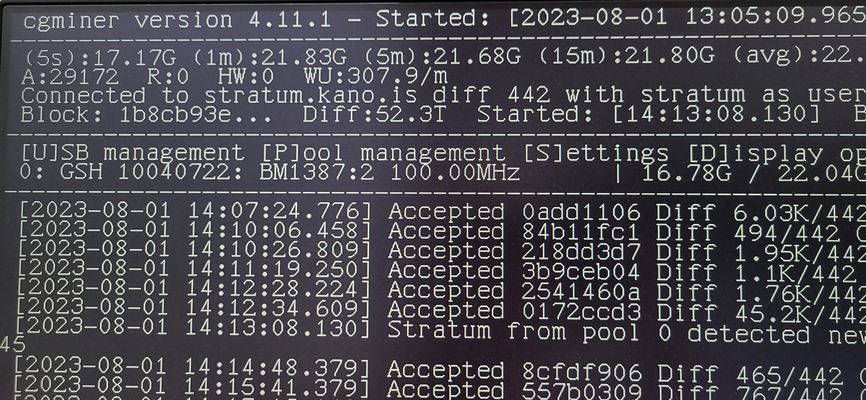
What is CGMiner 4.11.1?
CGMiner 4.11.1 is a popular open-source cryptocurrency mining software designed to work with a variety of mining hardware. It supports a wide range of devices, including ASIC, FPGA, and GPU miners. CGMiner is widely used by miners due to its flexibility, scalability, and ease of use. In this article, we will delve into the features and functionality of CGMiner 4.11.1, as well as provide a step-by-step guide on how to set it up and use it effectively.
Key Features of CGMiner 4.11.1
Multi-Pool Support
CGMiner 4.11.1 allows users to connect to multiple mining pools, enabling them to switch between different pools easily. This feature is particularly useful for miners who want to maximize their profits by mining on different pools.
Automatic Failure Detection
CGMiner 4.11.1 has a built-in automatic failure detection system that can detect and restart failed miners. This feature ensures that miners can continue to mine without interruptions, even in the event of hardware failures.
Remote Monitoring and Control
CGMiner 4.11.1 allows users to remotely monitor and control their miners using a web-based interface. This feature is particularly useful for miners who have multiple mining rigs or want to monitor their miners from a remote location.
Installation Guide
Step 1: Download CGMiner 4.11.1
To download CGMiner 4.11.1, visit the official CGMiner website and click on the download link. Make sure to download the correct version for your operating system (Windows, macOS, or Linux).
Step 2: Extract the Files
Extract the downloaded files to a directory on your computer. Make sure to extract all the files, including the configuration files and executables.
Step 3: Configure CGMiner 4.11.1
Configure CGMiner 4.11.1 by editing the configuration file (cgminer.conf). This file contains settings for your mining pool, wallet, and mining hardware.
Technical Specifications
System Requirements
CGMiner 4.11.1 requires a 64-bit operating system (Windows, macOS, or Linux) with at least 4 GB of RAM and a 2 GHz processor.
Supported Mining Hardware
CGMiner 4.11.1 supports a wide range of mining hardware, including ASIC, FPGA, and GPU miners.
Pros and Cons
Pros
CGMiner 4.11.1 is a highly customizable and flexible mining software that supports a wide range of mining hardware. It also has a user-friendly interface and remote monitoring and control features.
Cons
CGMiner 4.11.1 can be complex to set up and configure, especially for beginners. It also requires a significant amount of system resources, which can impact system performance.
FAQ
Q: What is the difference between CGMiner 4.11.1 and other mining software?
CGMiner 4.11.1 is a highly customizable and flexible mining software that supports a wide range of mining hardware. It also has a user-friendly interface and remote monitoring and control features.
Q: How do I troubleshoot common issues with CGMiner 4.11.1?
Common issues with CGMiner 4.11.1 include configuration errors, hardware failures, and network connectivity issues. To troubleshoot these issues, check the CGMiner logs, configuration files, and system settings.
Conclusion
CGMiner 4.11.1 is a powerful and flexible mining software that supports a wide range of mining hardware. With its user-friendly interface, remote monitoring and control features, and high customization options, it is a popular choice among miners. By following this guide, you can set up and use CGMiner 4.11.1 effectively and maximize your mining profits.