
Home » MINERS

If you’ve mined on NVIDIA cards any time in the last few years, you’ve probably tried GMiner.
It’s that no-nonsense CUDA miner people reach for when they want stable hashrates, decent efficiency, and a miner that doesn’t crash the moment you look away. No glitter, just results.
GMiner started as a favorite for Equihash-family coins and kept growing from there. These days it handles a long list of algorithms and coins on NVIDIA (and often AMD too), but the CUDA build is where it feels most at home.
You unzip it, write a tiny .bat file, and it just… mines.

Among all the mining programs that have come and gone, CGMiner still holds a kind of legendary status.
Version 4.11.1 was one of its last major releases — a stable, reliable build that miners stuck with long after newer forks appeared.
It’s lean, command-line based, and brutally efficient — no pretty interface, just raw control and performance.
CGMiner was originally written by Con Kolivas, a Linux kernel developer, and it shows — the tool behaves more like a professional system utility than a hobby project.
If you can live without a GUI and don’t mind typing commands, you’ll find it’s still one of the most precise and configurable mining programs ever built.
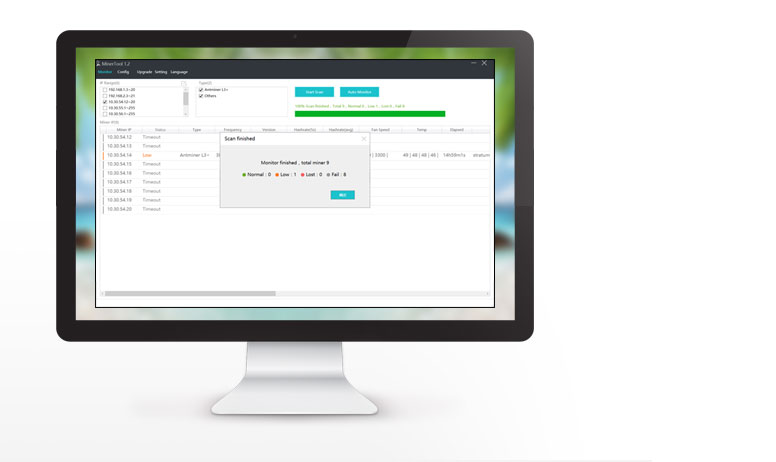
If you’ve ever run more than a couple of Antminers, you know the routine — one goes offline, another overheats, a few drift off the pool… and you spend half the night clicking through web panels.
That’s where APMinerTool saves the day. It’s a small Windows program made by Bitmain that lets you control every miner on your local network from one screen.
It’s not some overbuilt management system — it’s clean, direct, and brutally efficient. You scan the network, and within seconds, all your miners show up in a list.
From there, you can restart them, change pools, push firmware, or check hash rates without logging in to each device.
It feels like a tool made by miners for miners — quick, practical, no fluff.
If you’ve ever worked with a batch of Antminers and got tired of logging into every single one, APMinerTool is the time-saver you didn’t know you needed.
It’s a small Windows program from Bitmain that lets you find, monitor, and control all your miners on the local network at once.
There’s nothing fancy about it — it’s not cloud software, there’s no web dashboard, and you won’t find any “smart automation.” But that’s what makes it good. It’s clean, direct, and does exactly what it’s supposed to: you open it, hit Scan, and in a few seconds, every miner on your LAN appears on the list.
From there, you can change pools, reboot rigs, push new firmware, or reset units in bulk — all from one screen.
Back in the early days of GPU mining, before everything turned into complex scripts and massive farm software, there was a small Windows app called 50Miner.
It didn’t try to be fancy — it just worked. You’d run it, punch in your wallet address, pick a pool, and your card would start crunching numbers within minutes.
For a lot of people, this was their very first step into mining Bitcoin or Litecoin.
50Miner wasn’t its own miner — it acted more like a simple shell around cgminer and minerd. But that’s exactly why people liked it.
No command lines, no weird configuration syntax, no having to Google “cgminer parameters” at 2 AM.
Just a small window that said Start Mining — and when you clicked it, things actually happened.